Thermal payloads
Thermal Drone Camera Selection for UAV ISR
A platform-first method for comparing detector, lens, field of view, installed mass and image evidence.
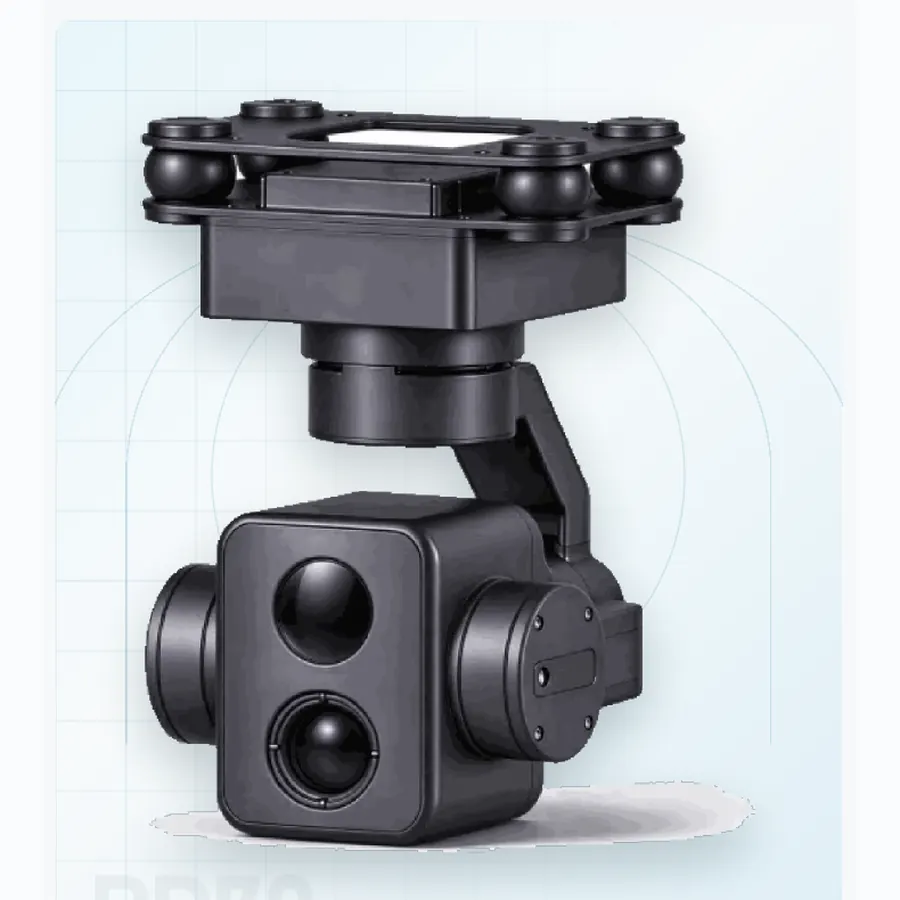
“Thermal drone camera” describes a broad family. A small navigation aid, an inspection payload and a long-range surveillance turret may all use an infrared detector, but they do not require the same resolution, lens, mass or calibration. Choosing the detector first is usually the fastest way to choose the wrong payload.
Start with the target, not the pixel count
Write down the smallest feature that must be recognized, the distance at which it matters, the required field of view and whether the output is a picture, a live video or a temperature measurement. A 640 × 512 detector can be the right choice for two very different missions when the lens and platform are matched to the task.
Read the thermal chain together
Detector resolution, pixel pitch, lens focal length, field of view, noise-equivalent temperature difference, frame rate and display processing all affect the useful image. A longer lens improves angular resolution but reduces field of view and increases sensitivity to platform motion. A wider lens helps search and situational awareness but makes small targets occupy fewer pixels.
Observation is not radiometry. A heat-map display does not by itself provide a calibrated temperature reading. If the mission requires measurement, ask for the relevant radiometric functions, calibration conditions and accuracy statement.
Map the platform constraints
For small UAVs, installed mass and power often decide the architecture before optical performance does. The PD70 compact dual-sensor gimbal combines a 640 × 512 thermal channel with 4K visible imaging in a 250 g-class three-axis format. The PT95B tri-sensor pod adds a thermal channel and laser rangefinder to a 700 g-class airborne package. The PD230 surveillance turret moves the same selection problem to a 20 kg fixed pedestal, where range and persistent observation matter more than payload mass.
These examples show why the platform belongs in the first paragraph of the requirement. A compact airborne pod, an inspection aircraft and a fixed-site turret have different optical, stabilization and interface budgets.
Compare image evidence, not only datasheet tables
- Ask for matched visible and thermal frames from the same scene and distance.
- Record the lens, field of view, gain mode, frame rate and any image processing used.
- Check contrast on low-difference targets, not only on a hot object against a cold sky.
- Test the zoom and stabilization setting the mission will actually use.
- Separate detector limits from display enhancements such as noise reduction or sharpening.
Integration checks that prevent surprises
Confirm the video format, control protocol, startup time, power range, connector type and behaviour after a link interruption. If the payload includes a laser rangefinder, treat its eye-safety class, range gates and interface as separate integration items. Ask whether the proposed firmware is the same revision used for the sample images.
Selection checklist
- Define target size, range, field of view and output type.
- Set installed mass, volume, power and data-link limits.
- Compare detector, lens and processing as one chain.
- Verify stabilization at the intended focal length.
- Request interface documents and matched image evidence.
- Run a short flight or bench test before freezing the configuration.
For comparison across visible, thermal and laser channels, see the optical stack overview. For a model shortlist, send the platform and target conditions through engineering contact.
Turn the mission into a pixel requirement
Start with the target dimension that matters. For a person, use the height or shoulder width depending on the task; for a vehicle, use the length or width. Estimate the distance at which the task must be performed. Then calculate the angular size of the target and compare it with the detector's instantaneous field of view. The result is the number of pixels across the target before atmosphere and processing losses.
Set a minimum pixel count for detection, recognition and identification based on the task and the operator's display. A detection may need only a few pixels, while recognition needs enough to see shape and context. Do not use a single threshold for every target. A vehicle with a distinctive silhouette may be recognizable with fewer pixels than a person in vegetation.
Repeat the calculation for the visible channel if the payload is dual-sensor. The two bands may have different usable ranges, and the operator needs to know which channel to use at each distance. The thermal drone camera category shows how the same calculation maps to the PD70, PT95B, PT130, PD230 and PD240.
Request the right thermal evidence
Ask for matched frames at short, medium and long range, with the target type, background temperature, lens, gain mode and processing settings recorded. Include a frame with the target partially obscured and a frame with a similar-looking distractor. The first shows detection; the second shows whether the tracker or operator can discriminate.
Ask for a video sequence, not only a still. Motion reveals noise, lag, stabilization and the behavior of the automatic gain control. A still frame can hide temporal noise and processing artefacts. If the supplier provides a processed image, ask for a raw or minimally processed frame for comparison.
Record the display used for the evaluation. A thermal image that looks clear on a large monitor may be difficult to interpret on a small ground-station screen. The operator's task and the display are part of the imaging chain.
Test the thermal payload on the aircraft
After the bench evaluation, mount the payload on the aircraft and repeat the same target at the same distance. Compare the image before and after the installation. Look for vibration, window contamination, cable interference and a change in focus. Run the motors at representative power and record the thermal image at the operational field of view.
Check the startup behavior at the lowest expected temperature and battery voltage. A thermal core may need time to stabilize, and a heater may add load. Confirm that the image is usable within the mission timeline, not only after a long warm-up. Record the time to a stable image and the power during warm-up.
If the payload has a laser rangefinder or a visible channel, verify the boresight after installation. A thermal target that is centered while the laser is offset will produce a location error. The specification guide explains how to include boresight and interface checks in the comparison.
Frequently asked questions
How many pixels are needed to recognize a person?
It depends on the task and display, but recognition generally needs substantially more pixels than detection. Define the task, calculate the pixel coverage at the range, and confirm with matched imagery. Do not rely on a single rule of thumb.
Does a higher-resolution thermal core always give a longer range?
No. Lens, pixel pitch, contrast, atmosphere and processing also matter. A higher-resolution core with a wide lens may put fewer pixels on a distant target than a lower-resolution core with a longer lens.
Should I choose a radiometric camera?
Only if temperature measurement is required. Radiometry adds calibration and workflow requirements. For detection and observation, a non-radiometric thermal image may be sufficient.
Why does the image change when the aircraft motors start?
Vibration, power transients, airflow over the window and electromagnetic interference can all affect the image. Test with the real propulsion and power system before accepting the installation.